Fantasy Mansion (Captain Credible's gear and EP) synchronised with POs

the light sensor is not very sensitive and not all modes react to it that strongly. but yeah, in most cases it should be immediately obvious what it does.

Hmm, maybe I should try in sunlight! Could be I was just in a dark-ish room, which I was.

Try it in theremin mode, thats where you can tell what it does the most… also, direct sunlight.

Try it in theremin mode, thats where you can tell what it does the most... also, direct sunlight.

Hot tip!

I’ll have to watch the instruction video again to figure out how to activate it :slight_smile:

1 Like

@nerdvous I had to share the green machine!

Looks so Hawt, and actually means I can take it around W/out worrying about damaging it. Had it on the bus the other day.

PS. @vehka I tried in better light, and the light sensor seems to work fine. I rly like the sounds out of this boy. Wanna do some sampalamps!


Man, I really love this lil green box :) How did you get the silver!?
1 Like

@ludicrousSpeed


Yeah, that green is pretty awesome… if its neon or bright, Im in! And if yer talking about the silver lettering, I did that with the coolest paint marker Ive found to date, Molotow Liquid Chrome… one of the few markers that actually looks like chrome.

Glad yer enjoying it man… he’s got some really cool stuff that he’s gonna be putting up for sale here soon… even better than the FM. Woot!
1 Like
@ludicrousSpeed

Yeah, that green is pretty awesome... if its neon or bright, Im in! And if yer talking about the silver lettering, I did that with the coolest paint marker Ive found to date, Molotow Liquid Chrome... one of the few markers that actually looks like chrome.

Glad yer enjoying it man... he's got some really cool stuff that he's gonna be putting up for sale here soon... even better than the FM. Woot!
No way, a marker! It looks so pro.

O rly!? I downloaded a bunch of his free VST plugins. Haven't tested em yet, but they look really fun.
1 Like

I’m trying to find one of these if anyone has one they’re willing to sell, Thanks.

I Found one, thanks.

2 Likes

Jealous, these look so cool!

2 Likes

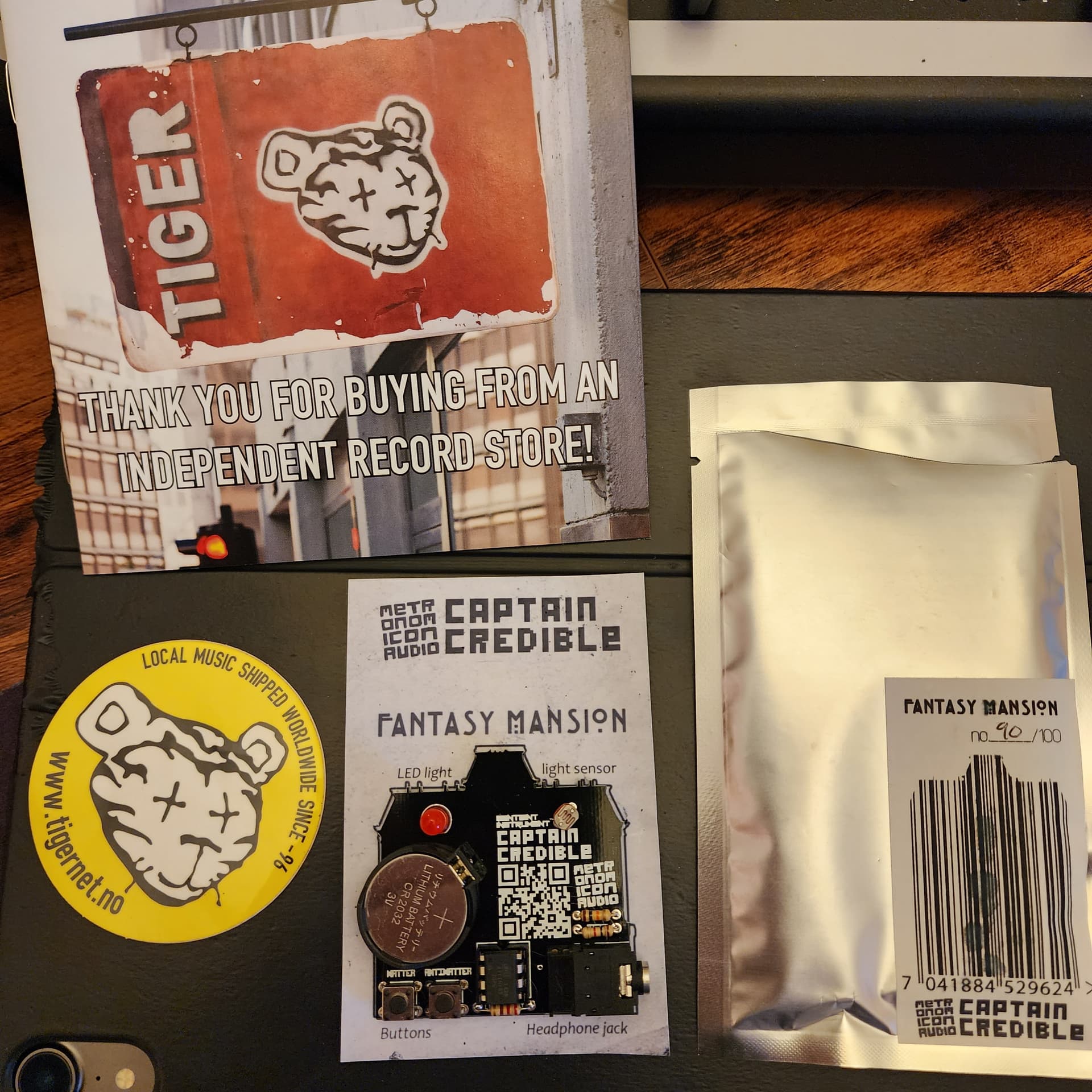
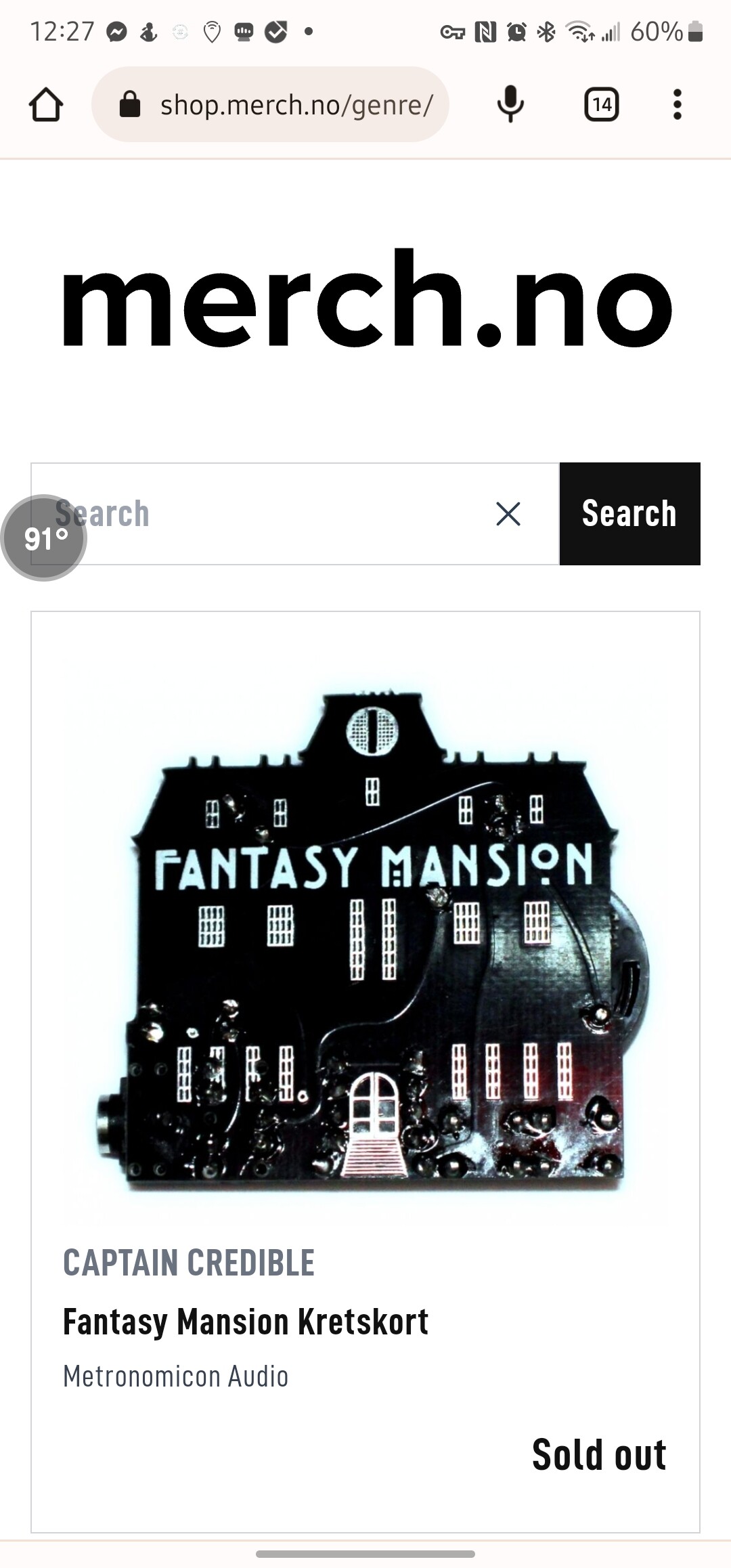
I’m honestly ever so hesitant to give this up because if I had the money I would buy them all because for some reason I feel like I need to have a bunch of these things. I guess it’s GAS!!! But here it is. Somehow a record store still has the fantasy mansions in stock at an amazing price plus shipping! I also didn’t want to post about this until I receive mine in the mail to make sure it was fully legit and I got mine.

https://shop.merch.no/genre/40741-indie

I believe this is the same place as well, but a different store front.

1 Like

Snagged one, don’t tell my wife :eyes:

I’m really excited to own a little piece of music history, this is so unique!

1 Like

This thing is really awesome, everything CC makes is pretty crazy! I’d love to get ahold of more of his devices. I also found an assembled Dead Cats on ebay the other day. Kits are available but I’m not that good a circuitry. Enjoy, all the best.

Well I knew it wouldn’t last long lol. I hope everyone that wanted one got one. I saw a post from Captain Credible that these were not meant to be a limited run, so they should continue to come out occasionally or when orders are placed. But for now here’s the result. Lol

1 Like

I just got it today, I love it! What a fun little guy. It is definitely sentient lol

1 Like

For anyone who needs it:

• OPERATION MANUAL

fig 1. back

Use light sensor together with buttons to manipulate pitch, control glitch or select notes and drums.

Press MATTER + ANTIMATTER to cycle through modes.

LED light

light sensor

CR2032 battery

Lithium Cel

CR2016

CAPTAIN

CREDIBLE scan the

nETR

QR code to download

20П

the rest of

AUDIO the EP

press these two at the same time to cycle modes

plug your headphone / P.A.

in here

Fantasy Mansion is a generative EP by the artist Captain Credible.

Comprising 8 downloadable tracks and one sentient musical instrument. It will be released on the record label “Metronomicon Audio” in June 2017. and can be ordered online.

The device harvests compositions from adjacent parallell universes using a “perlington demon gate”. Additionally there are 8 fixed compositions that have not undergone quantum smearing. These can also be audited on iTunes and spotify among other places.

fig 2. front

WARNING: Please refer to www.captaincredible.com for further information regarding this device, and the dangers of quantum uncertainty!

83#

FANTASY MANSION

E

Modes of operation:

1: Autotune

(fetches melody, bassline, chords, drums ++ from parallel universe)

Matter: Octave* or decay*

(depending on the circuitboards mood)

Toggle Bassline/Melody/Chords

Antimatter:

Mad glitch’n’pitch*

Toggle Drums

  1. My First Melody (Make your own melody!**)
    Matter: Add notes*
    Antimatter: Remove notes
  2. My First Bassline
  3. (Make Bassline for your melody**)
    Matter: Add notes’

Antimatter: Remove notes

4: My First Beat (make your own sick beat**)
Matter:
Add drums*
Antimatter:
Remove drums

5Patle my shit (do shit to your composition)

octave* or decay*

(depending on the circuitboards mood)

Toggle Bassline/Melody/Chords

Antimatter: Mad glitch’n’pitch*

Toggle Drums

  1. Mutant theremin
    Matter:
    play sound*
    Antimatter: shuffle dna (at you own risk)
  2. Portal glitch
    Matter:
    alter temporal plane*
    Antimatter: broadcast perlington demon signal***

SYNC:

Fantasy mansion can send sync to, or receive sync from externam musical instruments such as anoT ANaCIATIER butions, While pregging the minijack in, to enable different sync modes.

synthesizewrs and sequencers. Hold down different combinations of the “MATTER”

HOLD DOWN:

MATTER: Sync pulse sent out on left channel, tones sent out on right.

ANTIMATTER: Sync pulse sent out on right channel, drums sent out on left.

MATTER + ANTIMATTER: Waits for sync in on left or right channel.

attatchment 1. sample

attatch sample here.

  • Use the light sensor to choose notes, drums, octaves, glitchyness and more
  • *your compositions may be harvested by circuitboards operating from adjacent realities
  • ** can in rare instances cause accidental teleportation to the “demon realm”

MeTR onO

COI

AUDIO

CAPTAIN

CREDIELE

1 Like

Sorry for the necropost.

I’d like to add a few things for the community about Fantasy Mansion.

  1. Captain Credible published the source code for Fantasy Mansion a while ago on Github.

    https://github.com/CaptainCredible/FantasyMansion

  2. I was never able to build/compile the source code myself. It appears to be written in Visual Studio 2015 (version 14) with several add-ons that allow Visual Studio to target AVR chips. I can kind of deduce the add-ons from the contents of the .sln and .vcxproj files, but I still haven’t replicated the toolchain, so I can’t compile the firmware myself yet. My suspicion is that Captain Credible used VisualMicro (kinda expensive). I will instead try to convert the code to work in Microchip Studio or Atmel Studio (an obsolete free version of Visual Studio 15 meant for AVR).

  3. I did not know this until today when I stumbled upon it, but the fully-compiled FantasyMansion.hex firmware file is also in the repository!

    I was able to take this firmware and flash it to the ATtiny85 in my fully-assembled Bitmath Music Weasel (the development board Captain Credible designed to use to design/prototype these interactive EPs/synths). So, I now finally have a working Fantasy Mansion (I did have to add a second tactile switch to the Bitmath Music Weasel to match the two-switch controls).
UPDATE:

I managed to convert the original Fantasy Mansion source code to work with Microchip Studio (obsolete, but 100% free to download and still works). It was not hard–the source code in the .ino files didn’t change, just the project files. Basically, start with a new, blank project and transfer the .ino files over and recreate the project that way.

End result isn’t any different though. It will only be worth the effort if you plan to actually change the source code in the .ino files to get different behaviors than the original Fantasy Mansion.


Also, I have started to design an upgraded PCB to host the Fantasy Mansion firmware. Better/bigger buttons, more noise reduction circuitry, better grounding. The goal is to make it better for insertion into a touring rig to be blasted through the PA (still needs effects to reduce the chiptune harshness). Functionally it will be the same as the original Fantasy Mansion.


Finally, I was blown away by this demonstration of how to use DEAD CATS synced with an OP-Z. I have owned a DEAD CATS for years but didn’t know it could do all this!

I looked at the original operation manual and typed it out myself. Here it is:

Original Fantasy Mansion Operation Manual (as written by Captain Credible)

Use light sensor together with buttons to manipulate pitch, control glitch or select notes and drums. Press MATTER + ANTIMATTER to cycle through modes.

Press these two (MATTER + ANTIMATTER) at the same time to cycle modes.

Modes of operation:

1: Autotune
(fetches melody, bassline, chords, drums ++ from parallel universe)
Matter: Octave* or decay* (depending on the circuitboards mood), Toggle Bassline/Melody/Chords
Antimatter: Mad glitch’n’pitch*, Toggle Drums

2: My First Melody (Make your own melody!**)
Matter: Add notes*
Antimatter: Remove notes

3: My First Bassline
(Make a Bassline for your melody**)
Matter: Add notes*
Antimatter: Remove notes

4: My First Beat (make your own sick beat**)
Matter: Add drums*
Antimatter: Remove drums

5: Pimp my shit (do shit to your composition)
Matter: octave* or decay* (depending on the moon’s delta-v), Toggle Bassline/Melody/Chords
Antimatter: Mad glitch’n’pitch*, Toggle Drums

6: Mutant theremin
Matter: play sound*
Antimatter: shuffle dna (at you own risk)

7: Portal glitch
Matter: alter temporal plane*
Antimatter: broadcast perlington demon signal***

  • Use the light sensor to choose notes, drums, octaves, glitchyness and more
    ** your compositions may be harvested by circuitboards operating from adjacent realities
    *** can in rare instances cause accidental teleportation to the “demon realm”

And then I had AI take a look at the source code and generate a user manual from the actual program flow with minor human edits. There are some new things to learn from it, specifically about the sync modes. See below:


Fantasy Mansion — User Manual

Written from the firmware in FantasyMansion-master/ and matched to the original OPERATION MANUAL. Every control described here maps to a
real code path; references are file:line.


1. What you have and how power works

The Fantasy Mansion is a battery-powered generative EP or “sentient instrument.” It composes melodies, bass lines and
drum patterns, has a light sensor and two buttons, and can clock-sync with other gear (PO-32, Korg, Minijam .hub).

There is no power switch. Power is applied by the headphone jack’s internal switch:

  • To turn the unit ON: insert the 3.5 mm plug (or just plug a cable into the jack). This is the
    power-on event.
  • To turn the unit OFF: pull the plug out. The battery is disconnected, so there is no standby
    drain.

Battery: one CR2032 coin cell. Replace it by removing the plug (unit off) and opening the holder.


2. The controls

Control What it is Role
MATTER (SW1) tactile switch on ATtiny85 pin PB0 Live trigger / edit / boot-mode selector
ANTIMATTER (SW2) tactile switch on PB3 Live trigger / edit / boot-mode selector
Light sensor (LDR, PB2) CdS photocell Context-sensitive light control — effect depends on which button is held
LED (PB1) white LED Beat / sync indicator; also lights the LDR at boot to seed randomness
Jack 3.5 mm stereo TIP (LEFT) = drums & sync; RING (RIGHT) = melody. Plug-in = power

The buttons are momentary and are used like drum pads or step-sequencer edit buttons — tap, hold, or
release. The light sensor is the small mostly-round device with the zig-zag pattern on top. You move
your hand over it while pressing/holding one of the buttons.


3. Boot modes (choose a mode at power-on)

The unit reads the buttons the instant it powers up, so hold the button(s) down before applying
power and keep them held for a second after the unit starts.
Which buttons are held selects the
sync/audio layout for the whole session:

Mode A — Normal / Autotune (no buttons held)

Do not press either button. Insert the plug.
Melody plays out the RIGHT channel (ring); drums out the LEFT (tip). No sync clock is sent —
use MATTER or ANTIMATTER if you need to clock other gear.

Mode B — MATTER (hold MATTER only)

To enter: press and hold MATTER, then insert the plug. Keep
holding for about a second after it starts, then release.
Melody plays out the RIGHT channel; sync is transmitted out the LEFT channel (tip). The drum
generator is disabled
(drums are muted for this whole session).

Mode C — ANTIMATTER (hold ANTIMATTER only)

To enter: press and hold ANTIMATTER, then insert the plug. Keep
holding for about a second, then release.
This is the mirror image of MATTER: drums play out the LEFT channel (tip), and sync is
transmitted out the RIGHT channel
(ring). Melody is switched off for the whole session.

Mode D — Slave / sync follower (hold BOTH buttons)

To enter: press and hold BOTH buttons, then insert the plug. The unit
goes into “listening” — keep holding both buttons until it locks onto an external clock, then release
both.

In this mode the unit does not generate its own tempo. It waits for a clock signal on either
channel and auto-selects its role:

  • A rising clock pulse on the LEFT (tip) → the unit plays melody out the RIGHT channel,
    following the incoming clock.
  • A rising clock pulse on the RIGHT (ring) → the unit plays drums out the LEFT channel and
    jumps straight into My First Beat mode (see §5, mode 4).

The clock must be sustained for it to be accepted — brief electrical noise on an unplugged cable
won’t trigger a role. If no clock arrives within about 5 seconds, the unit stops listening and
boots as a normal Autotune master instead (just release both buttons and play on).

Cable convention: sync = TIP (LEFT), audio = RING (RIGHT) — standard for .hub / PO-32.

The Fantasy Mansion always acts as the master clock when it is the one sending sync (MATTER or
ANTIMATTER boots). Its ~3 V sync is strong enough to drive a PO-32. In slave mode it follows an
external clock, but a PO-32’s sync output is too weak (~1 V) to drive the Mansion’s ~1.8 V input
threshold — so in practice the Mansion leads and other gear follows.

The LED blinks on every beat/clock tick, so it doubles as a tempo check even without speakers.


4. During playback: the universal “next mode” gesture

At any time while the music is playing, you can advance to the next mode with both buttons:

  1. Press and hold both buttons together. You’ll hear a high “ding” (a 2 kHz blip) and the music
    collapses into a noise drone while you keep holding.
  2. Release both buttons together. The unit steps to the next mode (you’ll hear one ding per
    advance), re-rolls a new random composition, and starts the new mode.

Each press-and-release advances exactly one mode — one ding per mode step. To step through several
modes, repeat the full press-and-release gesture that many times. The ding fires on the press; the
advance happens on the release
, so you must fully press and release each time — holding both down
and pulsing them will not advance the mode.

The mode order (starting from a normal boot) is:

Advance # Mode What it is
start 1 Autotune (generative song + live performance)
1 2 My First Melody (record notes with the light)
2 3 My First Bassline (record bass notes with the light)
3 4 My First Beat (build a drum pattern with the light)
4 5 Pimp My Shit (do shit to your composition — same as Autotune)
5 6 Mutant Theremin (generative noise/texture performance)
6 7 Portal Glitch (light-pitched notes over a beat)
7 8 Autotune (same as start — see note)
8 0 Autotune (wraps around; the cycle continues)

In ANTIMATTER sessions (boot Mode C), Mode 2 (My First Melody) is skipped — the sequence runs
1 → 3 → 4 → 5 → 6 → 7 → 8 → 0 → 1 …, because melody is switched off in that session.

Your recordings survive mode changes. Once you write a melody or beat, the unit marks it as
preserved and keeps playing it when you come back to Autotune mode — only the random background
parameters are re-rolled as you step through modes.


5. Controls in each mode

The buttons trigger or edit; the light sensor (LDR) modifies the sound, but only when a button is
held.
The LDR is not a free-floating continuous controller — its effect is gated by the buttons
and varies by mode. Cover the sensor with your hand while holding a button to change the sound.

Mode 1 / 5 / 0 — Autotune (generative song)

Fetches melody, bassline, chords and drums from a parallel universe and lets you perform over them.

  • Hold MATTER — pitch-bend is active. Bright light bends the melody pitch up; covering
    the sensor bends it down. A chaotic drum-noise hit also fires. The bend range is moderate — you’ll
    hear a subtle sweep on high notes and a wider sweep on low notes. The octave also shifts at certain
    light levels, which can cause a sudden jump overlaid on the bend.
  • Hold ANTIMATTER — the light sensor controls either octave or note decay, depending on the
    song’s randomly-rolled “mood” (you won’t know which until you try). Octave mode gives you about 5
    discrete steps, not a smooth sweep. Decay mode changes how long notes ring out, but only affects
    notes triggered after you move your hand — notes already playing keep their old decay.
  • Release MATTER — a fresh random drum pattern rolls in, and drums toggle on/off
    (one release = drums off, next release = drums on).
  • Release ANTIMATTER — cycles what you hear: Melody + Bass → Melody only → Bass
    only → repeat. Each release steps to the next combination.

Mode 2 — My First Melody (record notes with the light)

Records your own melody, step by step, using the light to pick pitch. Drums and bass keep playing as
a reference track.

  • Hold ANTIMATTER — as each sequencer step passes, the note you’re pointing at with the
    light is written into the melody. Bright light writes a high note; covering the sensor writes a
    low note.
    Very dark light also flags the note to play an octave higher.
  • Hold MATTER — erases all notes on the step currently passing.

Mode 3 — My First Bassline (record bass notes with the light)

The same recorder, but for the bass line.

  • Hold ANTIMATTER — writes a bass note (picked by the light) at the current step.
  • Hold MATTER — erases the bass note at the current step.

Mode 4 — My First Beat (make your own sick beat)

Builds your own 16-step drum pattern. The drums are silenced until you write something.

  • Hold ANTIMATTER — places a drum hit on the next step. The light chooses the drum:
    • Dark (covered): kick (BD)
    • Mid light: hi-hat (HH)
    • Bright (uncovered): snare (SD)
  • Hold MATTER — clears the drum hit on the next step (all three types).

Mode 6 — Mutant Theremin (generative noise/texture)

A hands-on noise/solo playground. Drums are muted.

  • Hold ANTIMATTER — plays a generative noise/texture whose character changes as you move
    your hand over the light sensor.
  • Hold MATTER — enables pitch-bend of the tone.
  • Release both — the machine re-rolls its generative parameters and picks a random octave.

Mode 7 — Portal Glitch

Generative drum patterns plus light-pitched notes.

  • Press ANTIMATTER — steps through 5 different drum/timing patterns (each press picks the
    next one).
  • Hold MATTER — plays a note whose pitch follows the light sensor (with distortion),
    and continuously re-rolls the random generators.
  • Release both — let it play the current pattern on its own.

Mode 8 — Autotune (same as modes 1/5/0)

The code falls through to the same Autotune generator as modes 1, 5, and 0.


6. Light sensor (LDR)

How the LDR works

The sensor is read with an internal pull-up: brighter light → lower reading; covering it → higher
reading.
The processed value (x) ranges from 0 (dark) to about 624 (very bright).

Important: The LDR does not continuously control the music on its own. Its effect is gated by
the buttons
— you must be holding a button for the LDR to do anything in most modes. The one
exception is My First Beat, where the LDR selects the drum type while you write. Outside of these
contexts, the LDR reads a value but does not route it to the sound engine.

What the LDR actually controls

Mode Button LDR effect What to expect
Autotune MATTER held Pitch bend Subtle sweep; wider on low notes, narrower on high notes. Octave shifts can jump.
Autotune ANTIMATTER held Octave or decay 5 discrete octave steps OR decay change (only affects new notes). You can’t tell which without trying.
My First Melody ANTIMATTER held Selects note pitch Bright = high note, covered = low note. Written at each sequencer step.
My First Bassline ANTIMATTER held Selects bass note Same as My First Melody, for bass.
My First Beat ANTIMATTER held Selects drum type Dark = kick, mid = hi-hat, bright = snare. Three buckets only.
Mutant Theremin ANTIMATTER held Waveform character Changes the noise texture as you move your hand.
Portal Glitch MATTER held Note pitch Plays a note whose pitch follows the light.

Tips

  • The LDR responds slowly (~20–30 ms). Sweep your hand slowly for the sequencer to track it.
  • The “sweet spot” depends entirely on your room’s lighting. There is no universal setting.
  • In Autotune mode, try holding MATTER and slowly moving your hand from fully covered to fully
    uncovered. The pitch bend is the most audible LDR effect.
  • If the LDR seems unresponsive, try moving to a dimmer or brighter spot.

7. Quick reference card

POWER ON            Insert 3.5mm plug
POWER OFF           Remove plug

BOOT MODES          (hold before power-on, release ~1s after it starts)
  none held         Autotune — melody RIGHT, drums LEFT, no sync sent
  MATTER held       MATTER — melody RIGHT, sync LEFT, drums OFF
  ANTIMATTER held   ANTIMATTER — drums LEFT, sync RIGHT, melody OFF
  BOTH held         Slave — waits for external clock; LEFT pulse = melody,
                    RIGHT pulse = drums (My First Beat)

NEXT MODE           Press+hold BOTH buttons (hear "ding" + drone), release both
                    = advance one mode. 1 ding per step.
                    Dings from boot: 1=My First Melody 2=My First Bassline
                    3=My First Beat 4=Autotune 5=Mutant Theremin
                    6=Portal Glitch 7=Autotune 8=Autotune
                    (ding=on press, advance=on release: full press+release each time)

AUTOTUNE (1/5/0)
  hold MATTER       pitch-bend w/ light (subtle) |  release MATTER   new drums + drums on/off
  hold ANTIMATTER   light = octave steps or decay |  release ANTIMATTER  both / melody / bass cycle

MY FIRST MELODY (2) hold ANTIMATTER = write light-picked note @ step, hold MATTER = erase step
MY FIRST BASS (3)   hold ANTIMATTER = write light-picked bass note, hold MATTER = erase step
MY FIRST BEAT (4)   hold ANTIMATTER = place drum @ next step (dark=kick,mid=hat,bright=snare)
                    hold MATTER = clear next step
MUTANT THEREMIN (6) hold ANTIMATTER = noise texture, hold MATTER = bend, release = re-roll
PORTAL GLITCH (7)   press ANTIMATTER = next pattern, hold MATTER = light-pitched note
AUTOTUNE (8)        same as mode 1 (generative song + live performance)

How did I miss this thread? I own one of those gadgets. Bought Fantasy Manshion kit from the artist with the album, soldered it myself. Really fun toy. Gotta use it more like most of my gear.

Same here, it’s one of those pieces that’s easy to forget about and then immediately fun again once it’s in your hands. There’s something special about gear that sits somewhere between album, instrument, and weird little art object.

Also very cool that you built the kit yourself — that probably makes it feel even more personal. If you ever dig it out again, I’d be curious to hear whether yours behaves pretty consistently or if it has that slightly chaotic “mood of the circuitboard” thing going on too.