Free Stem Separation and Automatic Loop Export App for OP XY / OP1 Field

After purchasing an OP XY some weeks ago, I wanted to create my own samples from songs I like and use loops in my music. For this, I developed a StemSeperator app based on the best open source models.

It is available for download for free at: https://github.com/MaurizioFratello/…ator-arm64.dmg

I’d love for you guys to try it out, please give me feedback what could be improved or in case anything doesn’t work. I like the stem separation with associated automatic loop export a lot and use it for transcription, beat building and other stuff.

The app supports multiple separation modes including 2-stem (vocals/instrumental for
karaoke work), 4-stem (vocals/drums/bass/other), and 6-stem with individual piano and guitar
extraction. It includes several top-performing models: BS-RoFormer (SDX23 Challenge winner with 12.9 dB SDR for vocals), Demucs v4 (Sony MDX Challenge winner), and MDX-Net for fast vocal extraction. The app also features ensemble processing that combines multiple models for enhanced separation quality (+0.8-1.0 dB SDR improvement over single models), with staged processing to avoid artifacts. It takes full advantage of Apple Silicon MPS acceleration and includes a real-time stem player with individual volume/mute/solo controls, system audio recording via ScreenCaptureKit, and automatic audio resampling to 44.1kHz for model compatibility.

Using it is straightforward - drag and drop your audio files (WAV, MP3, FLAC, M4A, AAC, OGG), select your preferred model and quality preset (Fast/Balanced/Quality/Ultra), and hit process. The queue system handles multiple files sequentially, and for longer tracks over 30 minutes, it automatically chunks them into 5-minute segments to avoid memory issues. Once processed, the built-in stem player lets you audition your results with real-time mixing, and you can export either the individual stems or a custom mix. There’s also a beat-synced loop export feature that uses BeatNet for automatic beat detection and can generate perfectly time-stretched loops for sampler work. The interface is clean and professional with a modern dark theme, native macOS integration, and supports both English and German.
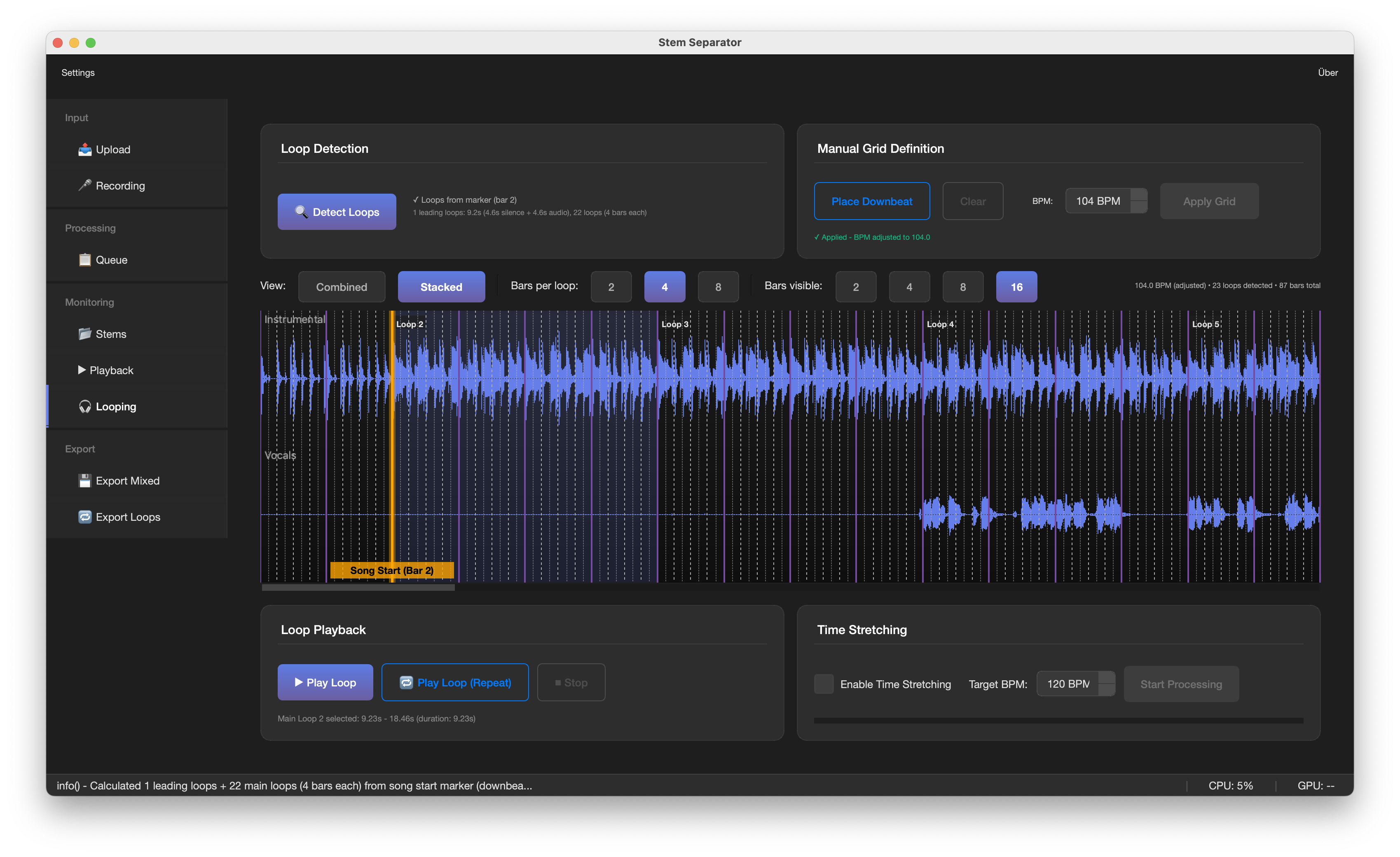

The latest v1.0.3 release fixes critical bugs in the packaged app (file saving and model loading
issues) and is now production-ready. It’s completely free, open source (MIT license), and available
for both Apple Silicon and Intel Macs. Download the DMG from the GitHub releases page - no Python installation required, just drag to Applications and you’re good to go. Models download automatically on first use when using it in your local IDE (total ~800MB for all models). Perfect for remix work, sample extraction, karaoke creation, or any workflow requiring clean stem separation.

Download: https://github.com/MaurizioFratello/…ses/tag/v1.0.3

10 Likes

This is amazing! :clap:

so you took the best algos and used AI? Or you programmed this yourself?

How long did this take?… Less than a decade ago only big firms has this type of code capital..

How does it compare in your opinion how does to the Ableton /logic Akai’s in quality etc.

Sounds like great work! I don’t suppose this is available on non-apple silicon.

1 Like

I might be wrong but I think I know answers to some of this after reading a bit on the topic

Yes, Maurizio programmed the app. It relies on math models trained on large datasets of multitrack music (technically the models are AI but ML - machine learning - might be a more accurate description and searching that term will give you a better idea of whats going on)

The models and datasets used for this app are public and open to anybody who wants to integrate them in research, analysis or a non-commercial project like this.

  • Logic uses Demucs trained on MUSDB18
  • Koala Sampler uses Spleeter which seems to allow custom user define datasets but is trained on MUSDB by default
  • Ableton relies on a company that licensed at least three custom datasets
  • Akai has no publicly available specs related to stem processing
2 Likes

@Eana I took the best open source ml models for stem separation and built the app around it. I did it myself, yes, but with the help of LLM coding tools. It took a couple of afternoons and early mornings with my newborn daughter sleeping on my lap. All in all maybe a week of full time work stretched out over a couple of weeks. I think the separation is excellent in my app, but it takes a little longer than in logic and Ableton. The quality is on par or better I would say.

@Worldwave It should theoretically work with intel Macs as well. I don’t have one though and cannot test the build. maybe someone with an Intel Mac can compile it from the repository and check…? It will be slower though bc Apple Silicon can use GPU/MPS acceleration which makes the ML models run MUCH faster than on a regular CPU.

@zunaito you are exactly right!

3 Likes

I was thinking about linux/windows but I understand you.

tried downloading and running the app but it’s not opening on my machine (m1 mac)

just a data point

Love this. I believe this sort of project shows how AI can concretely benefit people, organizations and communities.

My day job is as an editor, but I do code a little bit. I knew I wanted a program to crawl directories of videos, transcribe and timestamp them and then make a searchable database with a viewer to preview the timed search result footage. LLM helped me multiply my coding skills and guided me towards various open source tools and create a working video catalog/search tool in a matter of a couple of sessions.

I think this project is a similar thing, helping @MaurizioFratello to unite his wishes, his skills and an undiscovered world of FOSS tools to make something really great. But no greatness without the human in this human + LLM equation.

Hello,
I have a bug on install, “file is corrupted” (in french) at the check file step of the install process. 0n apple M1 sequoia 15,7,3 (I tried 3 times)
I follow your short process but it doesnt works

Moin Maurizio, is there a windows version planned?