I too am now getting this bug. It’s weird it was all working fine before. Does make it likely to downgrade if it persists.
I think the Teenage engineer are not gonna sleep a lot for Christmas.
I like this company very much and I hope they’re not having a bad time.
Looks like a new update has been released 1.6.5.
4 Likes
Wow, someone has been cramming before xmas! Now take a well deserved break TE team! 

3 Likes
seriously this is impressive. time for vacation i hope for the te team 
2 Likes
I know!!! they really did it this time (again)
1 Like
Whenever I plug a USB cable into my OP-1F, it basically locks up and is non-functional. The screen stays on, but none of the buttons or knobs do anything and I have to power it off. Doesn’t matter which cable I use or what’s plugged into the other end, happens every time. If I power cycle it, everything functions as normal, UNTIL I plug a USB cable into it.
Anyone else seeing this since the new 1.6.5 update dropped yesterday?
EDIT:
Looks like it was plugging it into my MPC Live III initially that caused it, as the same thing happens when I try and use the OP-XY with the Live III. Except that after a few seconds the XY hard crashes and throws the error screen. After that I can’t use USB at all on either device without it locking them up. However, I was able to factory reset both the 1F and the XY, and now they are working with other devices again. I just won’t try with the Live III anymore. 
Luckily I remembered that the Live III has bluetooth, so I was able to connect both the XY and 1F to it that way to do what I wanted. Weird, but sorted for now I guess.
I’m having issues as well with USB and bluetooth since the latest update. USB devices are not being detected in the Coms menu. Bluetooth ones aren’t connecting properly such as with my iPad.
Same here, BT and USB are very flakey since the update.
I updated to 1.6.5 and the multi-track cut and paste issue seems to have gotten worse. Now I get a straight-up error after I hit the paste button. Anyone else seeing this?
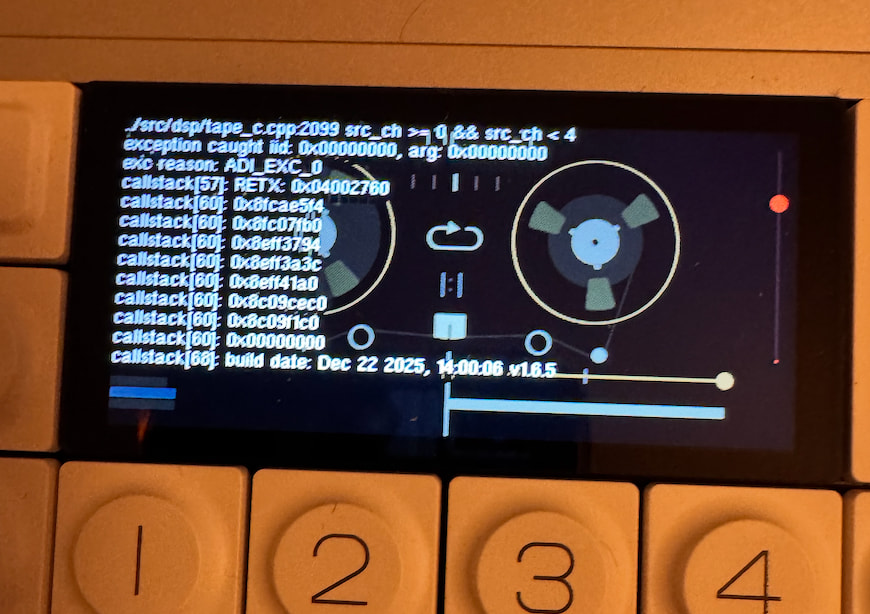
1 Like
I had this on a tape created before the update, but it doesn’t seem to happen on a fresh tape
After update, when shift lift up i have ghost tape with sound
try the latest update 1.6.7 that was released yesterday. from my view it fixes all the outstanding bugs that i was aware of at least !
1 Like