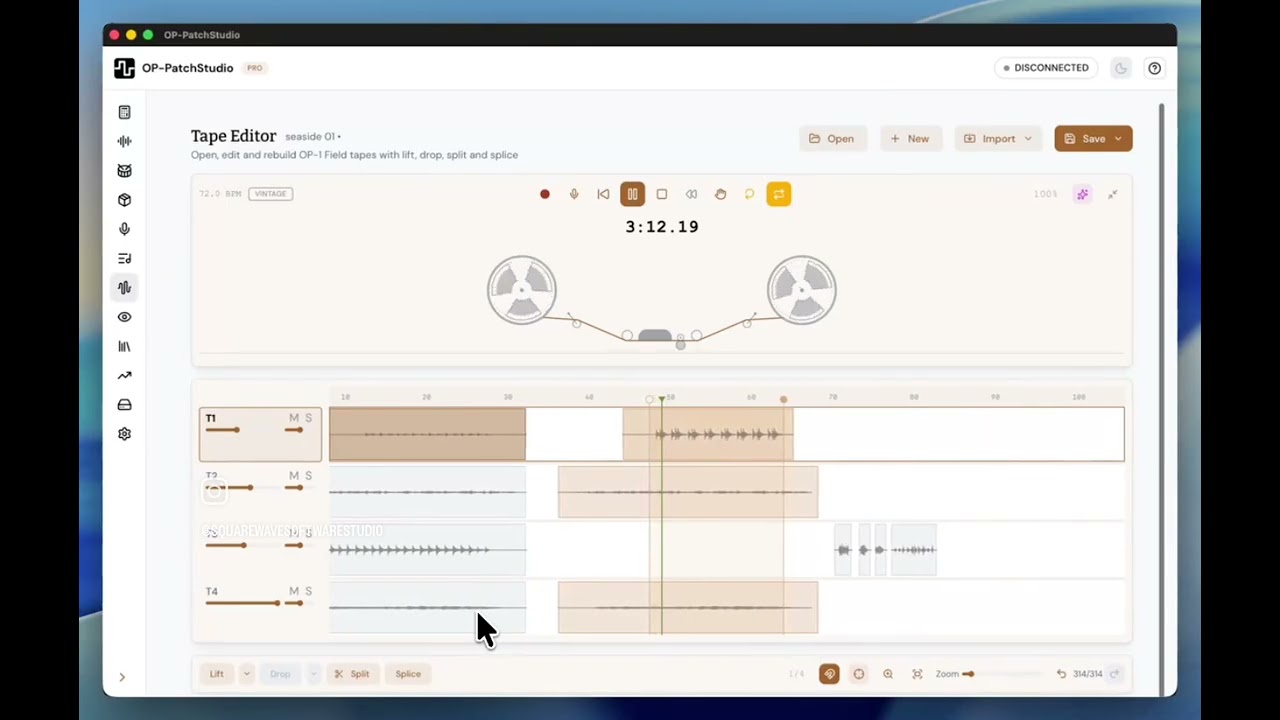
OP-PatchStudio [unofficial] OP-XY tools

I created this tool a while ago, but never shared it here. I hope you all enjoy.

I’ve been using various other tools for the last while, Digichain, ADSR, Operator-XY and this tool from buba447/zeitgeese, but nothing did exactly what I wanted. Many of them were able to create a basic presets with samples, but then on the XY you had to edit various settings, tuning, loop points, etc., then save as a new preset, but this was saved to snapshots, then you had to use a computer to rename and move the preset… Way too much messing.

So I forked the repo from one of the existing tools and released a beta opxy-tools. But it quickly became too hard to manage (single html with vanilla JavaScript), I then rewrote the entire application in React/TypeScript and added a whole load of new features to make things easier as well as making it look and feel more like a tool for the OP-XY.

GitHub - GitHub - joseph-holland/op-patchstudio: Tools for creating custom presets for teenage engineering devices

Core Functionality

  • Generate presets for OP-XY (with more devices coming soon)
  • Modern, responsive (mobile support), accessibility-compliant UI with drag-and-drop sample assignment
  • Real-time audio processing with format optimization
  • Native Windows, MacOS and Linux companion app in development for advanced funtionallity and device backup, etc.

Drum Tool

  • Virtual drum keyboard with OP-XY key mapping
  • Bulk operations for editing multiple samples
  • Waveform editing with snap-to-zero-crossing
  • OP-1 drum preset import support

Multisample Tool

  • Virtual MIDI keyboard with zone mapping
  • Automatic note detection from filenames and metadata
  • Loop point editing with visualization
  • ADSR envelope presets
  • Real-time sample playback with pitch shifting

Audio Processing

  • Interactive waveform editing with zoom modal
  • Audio normalization
  • Format conversion and export to WAV or AIFF with metadata preservation
  • Sample rate, bit depth (all the way down to 8-bit), and channel conversion
  • Gain adjustment with precise dBFS control

Library & Session Management

  • Local preset storage with search, filtering and preset favourites
  • Automatic session saving with 12-hour persistence
  • Private, no data sent to server, all local only
  • Session persistence using IndexedDB

MIDI Integration

  • WebMIDI API support for keyboard/controller input (control with your OP-XY too!)
  • Real-time MIDI note mapping with visual feedback
  • Velocity sensitivity for expressive playing

Mobile & Accessibility

  • Progressive Web App (PWA) with offline install functionality
  • Touch-friendly interface with proper touch targets
  • Screen reader compatibility
  • Responsive design for all screen sizes

Recording Capabilities

  • Built-in audio recording with device selection
  • Automatic metadata embedding
  • Playback preview of recorded samples
10 Likes

Follow & Support
OP-PatchStudio is a 100% free and open source tool for creating and editing drum and multisample presets for the OP-XY (more devices coming soon).
Most features have come from community ideas and requests. By joining the project Patreon, you’ll get behind-the-scenes updates, voting rights on roadmap features, priority support, exclusive content, tutorials and early access to preview features.
Your support helps cover the cost of AI coding tools and services that make rapid development of new features and support possible.

Patreon - OP-PatchStudio | free & open source preset creator for OP synthesizers | Patreon
Buy me a Coffee - https://buymeacoffee.com/jxavierh

4 Likes

Wow! Thanks for this man! =) going to try it out right now

1 Like

Thanks. Let me know if you have any issues or would like to request any new features too. There’s a Google Form built into one of the tabs.

Just downloaded it, and even before using, I can say that it looks stunning!
I will definitely work it soon, but the level of detail, and care for design, user interface and specificity to the device workflow is truly wonderful to see!
Thank you for making this, and your generosity in sharing it with this community!
Bravo!

3 Likes

Thanks for the feedback. It took absolutely ages to try and get it looking spot on. I even had a calipers out measuring up the actual device to get everything looking :ok_hand:.

A lot of the other tools I’ve used before work great, but don’t usually pay the same attention to the design elements. Given TE is a design company first and the XY and Field devices are amazingly designed instruments, I wanted to give OP-PatchStudio some of this feel.

I’ve not released the filters yet as I’ve not quite gotten the look and feel there just yet, but this is coming soon.

4 Likes

This looks awesome great work! Too bad iPadOS Safari doesn’t support WebMIDI, will OP-PatchStudio be able to at least transfer files back and forth?

There is an old app called WEB MIDI but it’s wonky now as it has not been update in years. :cry:

1 Like

So far so good. This is nice. The only thing I might say would be nice to add is on the drum tool allowing to set playmode to group

1 Like

Thanks for the feedback.

This is in there. On an individual drum sample, go into edit and then on play mode choose mute group.

1 Like

Ah cool. I didnt spend enough time poking around. So it has to be done per sample. Is it not possible to have it in the dropdown that affects all samples? This is a nice feature for sample based beatmakers

1 Like

No worries. That’s there too. At the bottom, the bulk edit button becomes active when you have two or more samples loaded to the drum tool.

In there you can change the play mode for all loaded samples and save.

Registered for the forum just to say thank you! This tool is unreal.

2 Likes

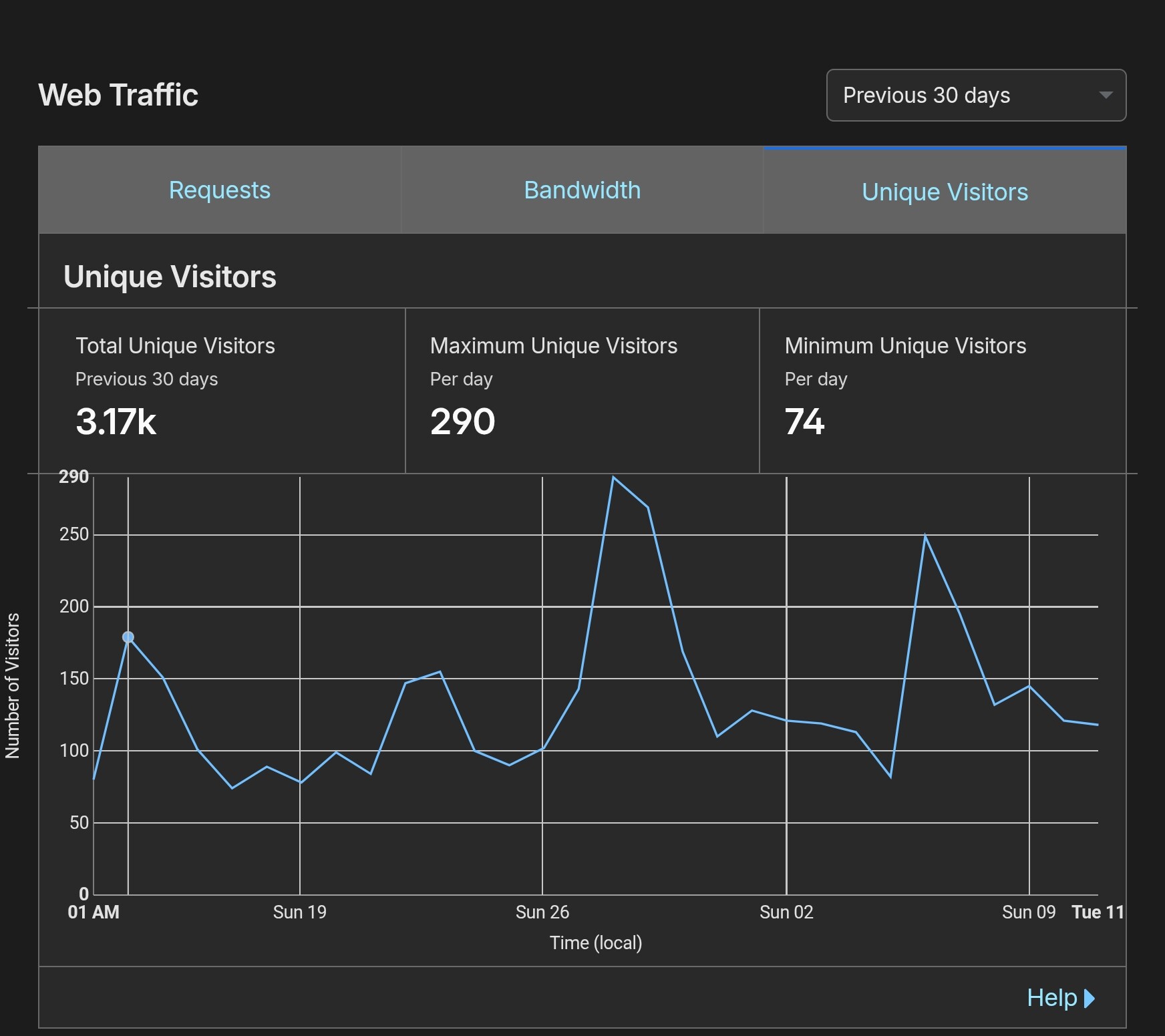
Thanks :face_savoring_food:. It’s my first open source tool that I’ve released widely. Currently have over 3k unique visitors per month using this on average, so that’s really cool. I made it open source to share and make available freely, but if anyone finds the tool useful, please support it via Buymeacoffee or Patreon.
Also use the feedback form to let me know what other features you’d like to see added! I’m think about a cloud patch save thing via Google Drive/Dropbox, so your entire OP-PatchStudio preset library is available across devices. There’s a planned companion app in development too that will allow presets to be sent straight to the XY from the webapp. It will also allow users to create backups of their device, etc.

7 Likes

Super job. Thank you.

1 Like

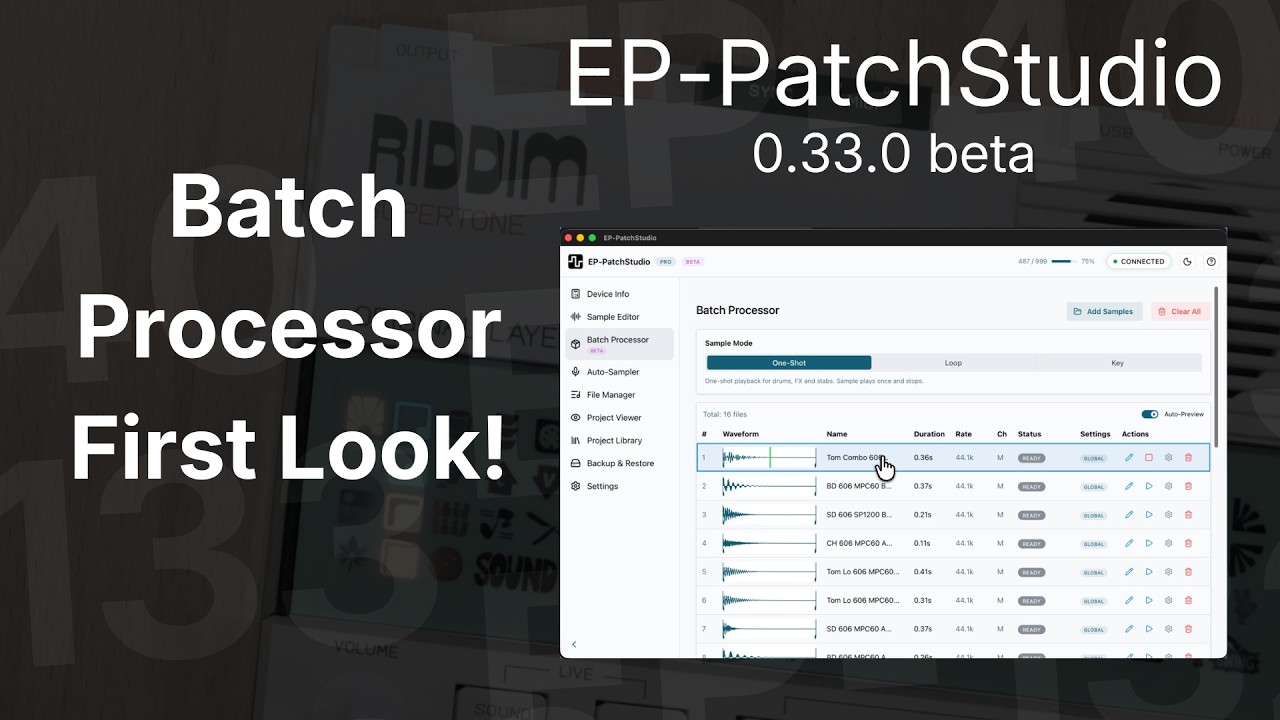
EP-PatchStudio 0.33.0 beta out now

New release for the EP-PatchStudio desktop app (multisample editor always free, cross-platform, for EP-40 Riddim, EP-133 K.O. II and EP-1320 Medieval).

The main thing in this release is the Batch Processor going to general availability. You can drag in a folder of samples, set your processing options once (normalise, fade, trim silence, resample, sample rate, bit depth) and apply across the lot in one pass. There’s a Sample Editor built into it with full waveform editing, in/out markers, zoom, loop region and per-file overrides all in a single tabbed modal.

The Beta badge stays for one more release. I’d really appreciate feedback while it’s there. If anything feels off or you’d like an option that isn’t there, please open an issue on GitHub or just reply to this thread.

Other notable bits:

- Trim to Sample Markers — new Crop button that destructively trims audio outside your in/out markers, mainly for getting longer recordings under the 20-second TNGE multisample limit

- Auto-Chop in Drum Kit mode — chops now land on the active scale’s kit pad notes instead of a chromatic sequence, so you can slice a loop straight into a playable drum kit on the EP-40

- Drum kit TNGE files now reopen in the Drum Kit layout instead of the melodic keyboard

- Fixed a multisample export bug when switching from Drum Kit to Melodic mode

- Windows microphone permission error in the Auto-Sampler now gives clear guidance instead of a generic input error

Since it comes up: the Sample Editor and Multisample Editor are free forever. No paywall, no time limit. The paid Superfan tier is only for the device management side (file manager, backups, Auto-Sampler). If you just want to build TNGE multisamples for your EP-40, the free version covers you.

Still active development. More on the way.

Download: https://ep-patch.studio

Changelog: Changelog | EP-PatchStudio

2 Likes