@Unflattered I think it came up before. Not sure about other people, but I backed it on Kickstarter. Excited to get it integrated in a mobile setup.
Now that’s what I’m talkin’ about!!!

@cloudburst, you lucky synth addict!
YESSSSS CB!!!
They look beautiful!!!
Haven’t had an awful lot of time to play them yet. Observations so far.
- Great sound
- Immediately loved all 3 - not just the JP-08
- A slight faff to put the modules in and out of the keyboard dock, but not a major faff
- Very light into in the user manuals; may resort back to the old Jupiter 8 user manual
- Mounting as a USB drive to my Mac doesn’t require Roland’s Boutique USB Driver s/w to be installed on my Mac
Couple of things I’m struggling to get my head around (help!):
- Loading an existing patch and then tweaking without switching to ‘manual’ mode; how does that work? Does any slider you operate ‘jump’ the parameter to the point you move it to, or does it adjust it by the delta you’ve moved it? how do you know where to slide it back to in order to revert without just re-loading the patch?
- MIDI interface; I use Logic Pro X on my Mac and my main use case will be to either control the Boutique modules with an other synth keyboard as a controller or to control the Boutique modules from the piano roll in Logic. I tend to record audio into Logic via my Presonus audio interface and I tend to use the DIN MIDI interfaces on there to have external keyboards control software instruments. So I have 3 options to connect the Boutique. DIN MIDI via Presonus interface. DIN MIDI via Roland UM-One mk2 USB interface or USB straight in but via Boutique Driver I’d need to install. What are the pros and cons?
Thanks folks.
I’ll keep you posted.
CB
@cloudburst where do the strengths in each of the 3 lie?
Do you mean which synth is most suitable for which sounds?
Help me with my questions and I’ll tell  lol
lol
CB
Yeah. Pads, bass, leads etc.
You scratch my back? Haha
The Manual button simply means that the sounds match precisely the current state of the knobs and sliders. I can’t help you when not in manual mode, I ain’t got one! Do some tests and feedback. It’ll either jump or catch I would have thought.
As for Midi, no difference performance wise I wouldn’t have thought. Have you got enough free USB ports to run them all in and out of?
I got the JU-06 and JX-03 and very pleased with them, got the JP-08 on pre order but won’t arrive for a week or two. Unlike most over 40 synth bores this particular synth bore is pleased about the size and battery power
Ok - so far I’m thinking of JP-8 for leads, JU-6 for warm pads. JX-3 I really liked on first play so will soon settle on its role. I’ll need to investigate bass a bit further. Actually…being a bassist I’ve got results I really like from my OP-1 with just a small amount of unison from my real bass DI’d. I may also look at the Yamaha Reface DX-7 for bass.
CB
@cloudburst - I’ve got the JP-08, if you edit a patch then the parameter jumps to the slider position when you change it. Best to open the filter right up if you are tweaking and do a bit of trial and error…It’d be better if it flashed the led when you hit the patch parameter value or something like that… maybe they’ll be an update.
I’ve been looking to find out what the parameters for each patch are but can’t find anything - found a nice set of patch sheets for the original Jupiter 8 but nothing for the JP-08 yet
Cheers, Paul
Nice one - thanks. I guess I’m happy enough that it works like the familar JP-8.
CB
Hey man,
I found the same thing with the presets. I started to get lost. Then after going back to the presets I realized I can just tweak one knob and see where it’s preset position laid. Then I’d do the same with another knob. And another knob. Then I started getting crazy and tweaking more than three at the same time.
After my enjoyment lept and bound numerous amounts I ended up with an original sound that was all my own. Although I still don’t think it’s completely my own. But I guess that is what modular (duh duh duhhhhh) synthesis is for!
Anyway, I love my Roland synths, and further more, the System 1m is one mean mo’fo’ so much so that I’d say it is capable and more powerful than any other synth I own. But for now however, my favourite is my JU-06
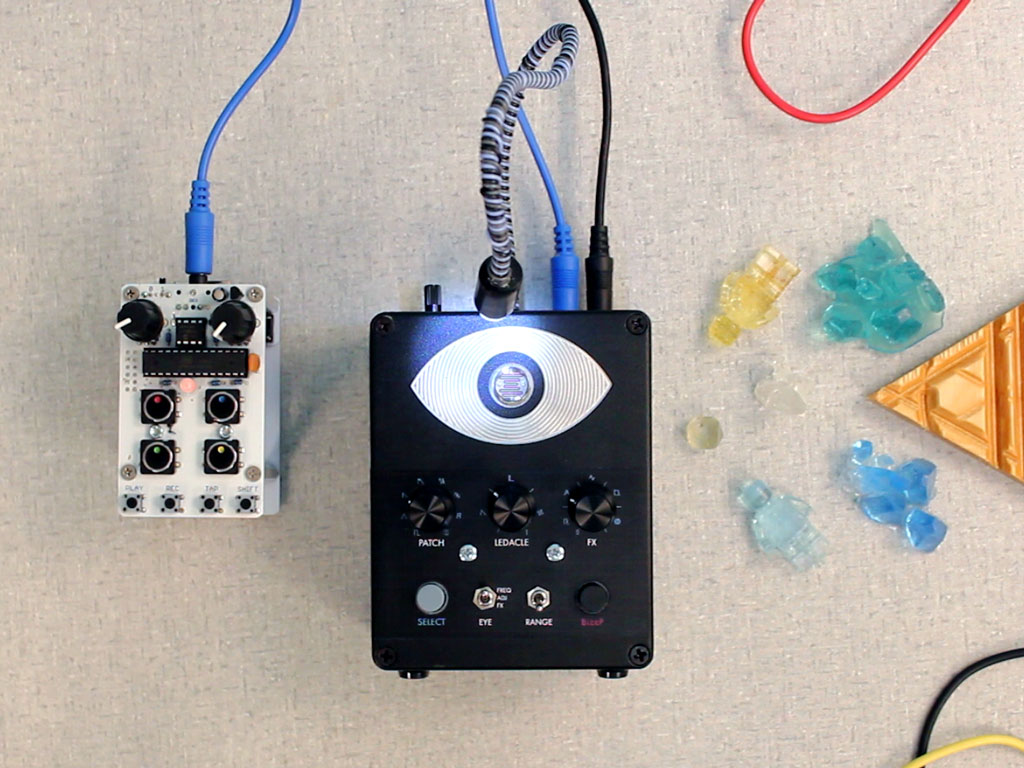
"The Thingamagoop 3000 is a light controlled synthesizer, effect, and noise friend.
The eye switch allows the photosensitive eyeball to change either the frequency of the sound, the patch adjust, or the fx adjust. When patch or fx is selected, that knob become the frequency control.
The USB jack allows the device to act as a USB MIDI device and can be used to reprogram it from the Arduino IDE.
Use the device like a monosynth by plugging in a keyboard or sequence the frequency, modulators and much more by plugging it into a DAW."
https://youtu.be/8CGEIZFgIQM
I have the XKey 37, and although it is the larger version and not wireless, it's SUPER portable. Just one micro USB cable with a lightning adapter, and it's good to go with an iPad. And it's built nicely and plays well, too (polyphonic aftertouch!). It's easily the best midi controller I've ever owned, and I've owned like a million.I have an Xkey 37. And a 25. My only complaint is that you CANNOT change the MIDI channel without an iOS device or a computer. Twice now I’ve requested a way to do it on the keyboard with a key combination. Alas, nothing yet.
@wingo, would you mind telling me if you can easily switch XKey 37 MIDI channel ? I mean : without a computer, live channel switching.
I’m about to send the iCon 49 back, I just need easy MIDI channel switching.
Not sure what happened to that post, but my reply was this:
I have an Xkey 37. And a 25. My only complaint is that you CANNOT change the MIDI channel without an iOS device or a computer. Twice now I’ve requested a way to do it on the keyboard with a key combination. Alas, nothing yet.
Hey @Sparky, thank you for answering !
You will be very glad to learn that you are wrong 
I contacted CMO, and the CEO told me that the last firmware offers to change the MIDI channel à la volée !
If I understand correctly, by hitting both pitch up and pitch down you access to such functionality (if you previously enabled it in the software editor).
This is very good news

Thanks @LyingDalai
It works! Fantastic!! This was my only gripe. I even spoke to them at NAMM and they said "yes, we'll consider it". I'm very happy now. I checked, and it works on the Xkey 25 after a firmware update also.
@LyingDalai, thanks for sharing that info. Good reason to believe it’ll be included in the forthcoming XKey Air, which I’ll be getting.
I question the value and utility of this company’s little instruments/gadgets, but they may appeal to some here.
A thumb-piano.