one silly question: the quad lfo features just a sinus waveform, is that right?
have you enabled the latest build with lift/drop/cut and presets on Euclid? that’s next level with individual volume per cycle 
indeed by now it’s more like a motion sequencer (maybe we could implement to lift and drop waveforms done on the etch a sketch)  but there’s potential, it’s awesome on the tape-echo, turning it into a thyme
the reverb so lush could be a “grandmother” 
1 Like
that’s also really nice in poly for overlapping notes building a chord that’s ever changing, transpose it here and there, change a pattern, lift/drop, reduce the decay and release, play chords on top of the running sequencer that’s super musical 
i´ve installed the v1.0..there is no lift and drop
try now, granular can now do its own sampling thing 
12 mins ago…
-
custom synth engines with their own screens: supersaw (chainsaw), fmbell (bell), granular; they follow note velocity
- granular plays the slot’s sample: press input on a granular slot for “keyboard to sample” and record straight into it (the slot stays granular); red press = page 2, sample gain (0–4×)
-
animated lab screen for the stock iter synth: gauges follow the knobs; bubbles, flame, falling dashes, voice dots and a note display react to the knobs and to what you play (graphic:
iter-lab.svgfrom op1repacker, MIT License, © 2016 op1hacks) -
boot screen shows
op1r <version>under the TE logo -
custom FX with their own screens, usable on instruments and as master FX (mixer):
-
tape: vintage tape echo (time with tape-speed pitch bends, feedback up to self-oscillation, wow & flutter, age)
-
clouds: granular texture FX, a port of Mutable Instruments Clouds (position, size, pitch, density; encoder presses switch to a second page, red press freezes)
-
reverb: lush plate/hall reverb, a port of the Mutable Instruments Elements reverb (time, mix, diffusion, tone); generic FX screen
-
-
quad LFO: four LFOs in one slot, shown as four lanes over the full screen
-
blue frequency (0.05–20 Hz), green amount (bipolar), white target, red destination
-
works on synths and drums; targets: engine knob, envelope (synth ADSR, drum envelope) or FX knob
-
each LFO runs per voice (locked to the notes, like the stock LFOs) or free-running (white dot next to the target)
-
press an encoder to select LFO 1–4
-
-
euclid sequencer, an extra sequencer next to the stock ones (pick it in the sequencer list), for synth and drums
-
6 sequencer slots, each playing one note; Shift + white selects the slot, a note key on the euclid screen assigns its note, at the octave of that moment
-
blue steps, green pulses, white rotation, red start/stop (Shift + red: all slots); press an encoder for page 2: rate (1/4 … 1/32, triplets), gate, octave, level (note velocity, per slot)
-
the level is always shown as a red bar at the right border (triangle next to the dot while red is on page 2); a playing slot shows a red dot in the centre of its ring
-
Shift + G A B C D E (the last six white keys) mutes/unmutes slots 1–6, Shift + D# mutes/unmutes all; a muted slot keeps running (dimmed dots) but plays nothing; works from any screen
-
Shift + C# starts all slots at once, or stops them if any is running; works from any screen. Hold REC (tape armed) while starting and the tape starts recording with the first step
-
4 patterns per synth/drum: Shift + F G A B (the first four white keys) switches to pattern 1–4 immediately, from any screen (also the tape view). A pattern holds the notes and settings of all slots incl. mutes; which slots are playing stays the same across patterns. The pattern number (P1–P4) is shown bottom left
-
on the euclid screen lift / drop / scissorscopy / paste / cut the selected slot; with Shift the whole pattern
-
runs at the OP-1 tempo, plays polyphonically and sends MIDI; slot settings and mutes are saved (slots come back stopped)
-
-
hidden OP-Z controller mode in COM → CTRL, switched on by the SysEx
F0 00 20 76 00 01 03 F7from the host (any MIDI tool that can send SysEx;F0 00 20 76 00 01 00 F7switches it off)
4 Likes
can´t run the script till the end, it all packs together and then i got this error:
patch_op1.py: error: unrecognized arguments: what the patch contains + checksums
all good, search for “op1r” folder on your computer, because it’s most likely ready but that info is from the greyed text within the python script, I think you’re good but otherwise check ya dms 
got the error, dumb user! Works fine, sampling into the granular engine is super fun!
1 Like
Yep it’s just sine right now but I’d like to add more options. Maybe a second page… with op1 the question is always how to integrate it into UI
edit: new waveforms are in, plus an option to use tempo sync instead of frequency
2 Likes
There is a web patcher now, check it out
6 Likes
perfect timing! I had just been searching around how to update. Updating now. 
Duuuuude… I just had a super quick play as I’ve gotta leave for a rehearsal but this totally breathes new life into the OG-1. Thank you.
1 Like
afterlife really, it’s elevating into another realm
the Euclidean is so powerful with the presets, master transpose, individual mutes, lift/drop the individual cells and all the engines are top notch
3 Likes
-
quad LFO: four LFOs in one slot, shown as four lanes over the full screen
-
blue frequency (0.05–20 Hz), green amount (bipolar), white target, red destination
-
works on synths and drums; targets: engine knob, envelope (synth ADSR, drum envelope) or FX knob
-
each LFO runs per voice (locked to the notes, like the stock LFOs) or free-running (white dot next to the target)
-
press an encoder to select LFO 1–4
-
hold Shift for a table of all four LFOs: blue frequency / tempo division, green smoothing, white waveform (sine, triangle, ramp up/down, square, sample & hold), red sync to the OP-1 tempo (4/1 … 1/32, triplets)
-


XY users will love this 

-
MIDI CC control (USB MIDI, on the OP-1’s MIDI channel):
-
keys: CC = key code + 5 as in the OP-1’s own CTRL mode, value ≥ 64 press / < 64 release: 5 help, 6 metronome, 7–10 synth/drum/tape/mixer, 11–14 T1–T4, 15–17 lift/drop/scissors, 21–25 and 50–52 the keys 1–8, 26 sequencer, 38/39/40 REC/PLAY/STOP, 41/42 left/right, 43 Shift, 48 mic/input, 49 COM
-
encoders: CC 102–105 = blue/green/white/red, relative (1–63 up, 65–127 down); works on every screen
-
mixer: CC 106–109 track 1–4 volume, 110–113 pan (64 = centre), 114–117 mute (≥ 64 = muted); CC 118 tape input level
-
4 Likes
if there is some need for graphics, i can help…the reverb looks so blank!
1 Like
-
dots step sequencer (pick it in the sequencer list), for synth and drums
-
6 slots playing at the same time, each up to 64 steps (4 rows of 16 dots); a step is empty (grey) or a trigger (green) with its own note and level
-
blue moves the cursor, Shift + white selects the slot, red starts / stops the slot, Shift + red (or Shift + C#) starts / stops all slots
-
REC switches recording on / off, press red chooses the type: REC (step: a note key puts a trigger at the cursor and moves on) or LIVE (while the slot runs, keys are recorded at the playhead, quantised, with the gate taken from how long the key is held; while stopped LIVE records at the cursor). Keys always sound
-
while recording: red sets the level of the trigger, Shift + blue erases while moving, green changes the length, Shift + greenextends to the next full row and copies the row above
-
per-trigger parameters (white; press white to choose the parameter): gate (or tie), ratchet 1–8, chance, condition (play in loop a of b), nudge (±1/2 step), ratchet level ramp
-
mutes (Shift + G A B C D E, D# all), 4 patterns (Shift + F G A B), lift / drop / scissors copy / paste / cut the slot (Shift: whole pattern), all saved
-
GOATED
6 Likes
Blockquote
im taking a similar approach with filter (dispatcher)
im finding that out the hard way. but i did finally manage to get it working on device. a degrader with 8 parameters. im still working out how to address either a second page or 8 parameters with 4 knobs without using shift (i like having shift=finetune). just debug text readouts for now as im not a visual designer. but the dsp is legit
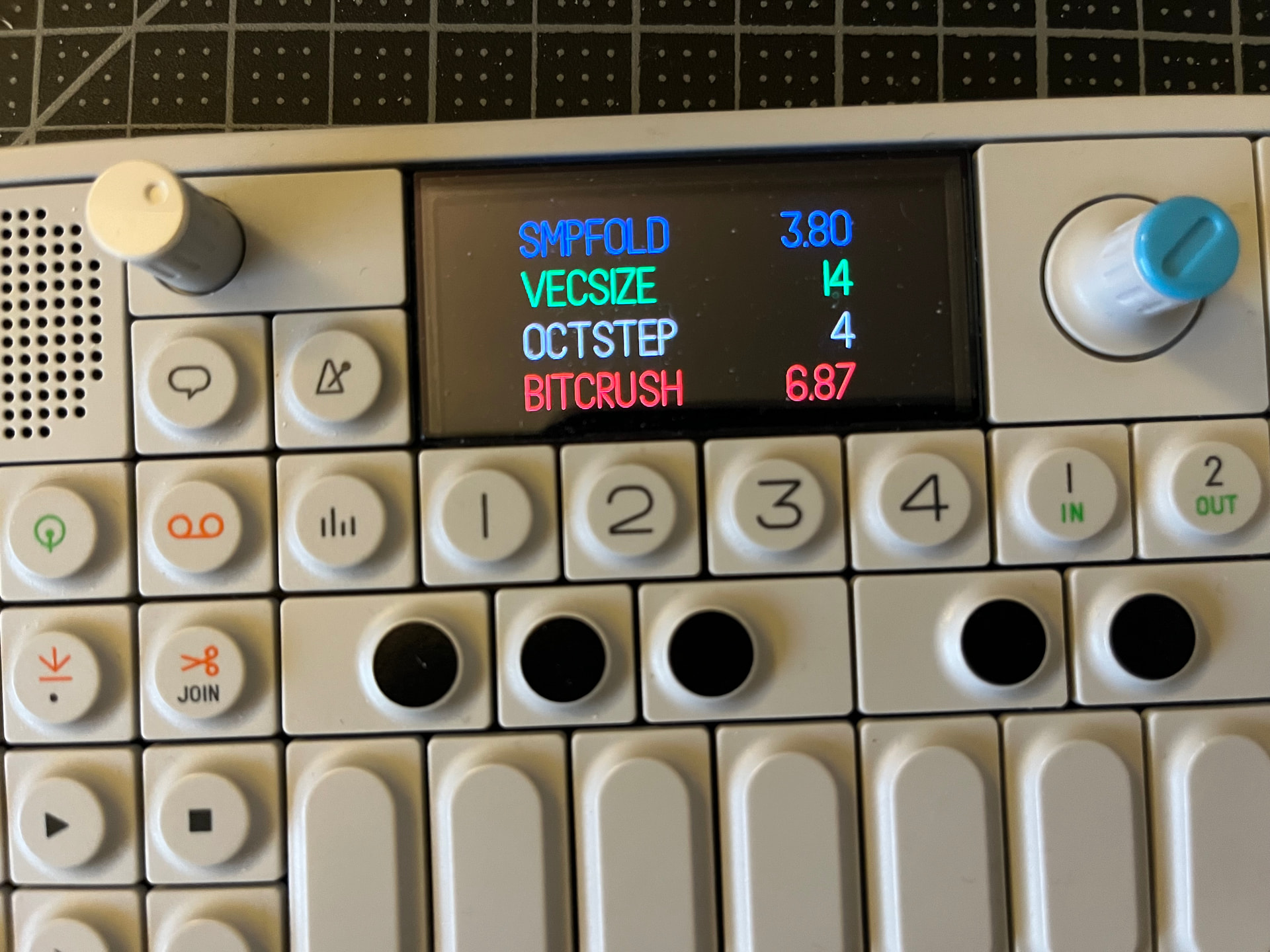
5 Likes
I use encoder press to toggle the parameter, works well in many places.
3 Likes
That’s all so damn crazy, guys!!! Such Impressive work you did!
Will the total Storage on og be stuffed quickly adding more programs? How much additional stuff would be possible?
2 Likes
the additional things you’ve added to the Dots sequencer are completely awesome! so damn nice
1 Like